Chexed.net
Chexed.NET Let's fix it. Computer & Tech Help.
ProcessPurge Logo

ProcessPurge v0.9.3

A lightweight and powerful Windows utility designed to help you quickly terminate unnecessary applications and free up system resources.

Download Latest Release Learn More

Purpose

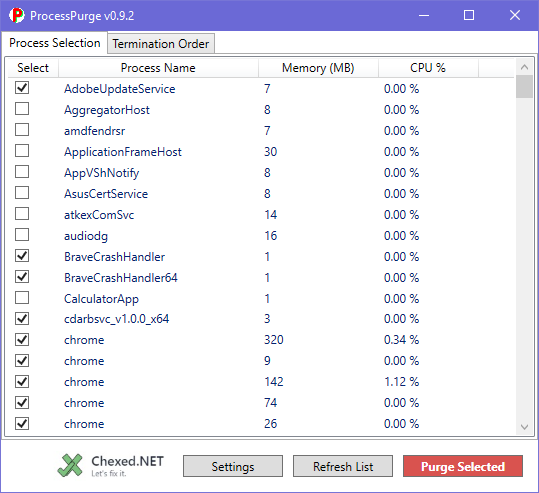
ProcessPurge allows users to create a pre-defined, ordered list of applications to close. With a single click from the system tray, you can "purge" these selected processes, making it ideal for gamers, developers, or power users who need to quickly optimize their system's performance without navigating the Task Manager.
Key Features

Feature-Rich and User-Friendly

  • Comprehensive Process List: View all currently running processes on your system.
  • Advanced Sorting: Sort the process list by name, memory usage, CPU usage, or selection status.
  • Flexible CPU Monitoring: Choose between a fast, low-resource view of total CPU time (default) or enable live CPU percentage monitoring in the settings.
  • Customizable Purge List: Select specific processes to add to a "Termination Order" list.
  • Ordered Termination: Arrange the processes in your purge list in the exact order you want them to be terminated.
  • System Tray Integration: Runs quietly in the system tray for quick access. Right-click to instantly purge processes, open the main window, or access settings.
  • Safety Features: Includes critical process protection by default and a confirmation dialog to prevent accidental clicks.
  • Persistent Settings: Your custom purge list and all settings are automatically saved and reloaded.
  • Automatic Startup: Configure ProcessPurge to start automatically and silently with Windows.

Changelog

Version 0.9.3

  • Bug Fix: The "Start with Windows" feature now correctly creates the startup task on the first run after installation.

Version 0.9.2

  • Feature: Added an optional, live "CPU %" column for detailed monitoring.
  • Feature: Re-introduced the fast "Total CPU Time" column as the default view.
  • Feature: The application now performs an automatic refresh shortly after startup to clear any residual processes from installation.
  • Bug Fix: The user-defined "Termination Order" list is now correctly preserved after a purge operation.
  • UI: The "About" window is now a custom window with more details and clickable links.
  • UI: The Start Menu icon now displays correctly.
  • UI: Added a "Settings" button to the main window for easier access.

Screenshots

ProcessPurge Main Interface Screenshot

Main Process Selection

ProcessPurge Termination Order Screenshot

Termination Order & Settings

Installation & Requirements

Installation

  1. Download the latest setup.exe from the Releases page.
  2. Run the installer and follow the on-screen instructions.
  3. On the first launch, you will be asked to accept the user agreement.

System Requirements

  • Operating System: Windows 10 or Windows 11.
  • Framework: .NET 8 Desktop Runtime (or newer).
  • Permissions: Requires administrator privileges to run.

Credits

  • Developed by: David Rader II.
  • Thanks to my wife for putting up with me: Dawn Rader.
  • Lead AI Assistance: Gemini 2.5 Pro.
  • Additional AI Consultation: Grok.
  • Special Thanks: To MaSTERmIKK of GitHub for providing my first thorough project feedback.

Disclaimer

You are using this software solely at your own risk. It is provided 'as is' without warranty of any kind. The author is not responsible for any data loss or system instability that may result from its use.

https://www.chexed.net/